Introduction
In today’s digital world, showing up consistently—and strategically—on social media isn’t optional, it’s essential. But how do you know if your efforts are paying off? That’s where a social media audit comes in. And no, it doesn’t have to take hours. In just 30 minutes, you can evaluate what’s working, what’s not, and where to improve—so you can make smarter decisions moving forward.
This step-by-step guide will help you quickly audit your social media channels, clean up inconsistencies, and identify growth opportunities—all in under half an hour.
What is a Social Media Audit?
A social media audit is a process where you review all your social media accounts and measure their performance. It helps you understand what’s working, what needs to be improved, and where to focus your efforts.
Why You Should Run One
If you’re posting content but not seeing growth or engagement, you might be missing key insights. An audit helps you align your goals, find gaps, and create content that connects better with your audience.
Before You Begin: Set a Timer
- This is a 30-minute sprint. Set a timer to keep yourself focused. You won’t go super deep—but you will cover the most important aspects quickly.
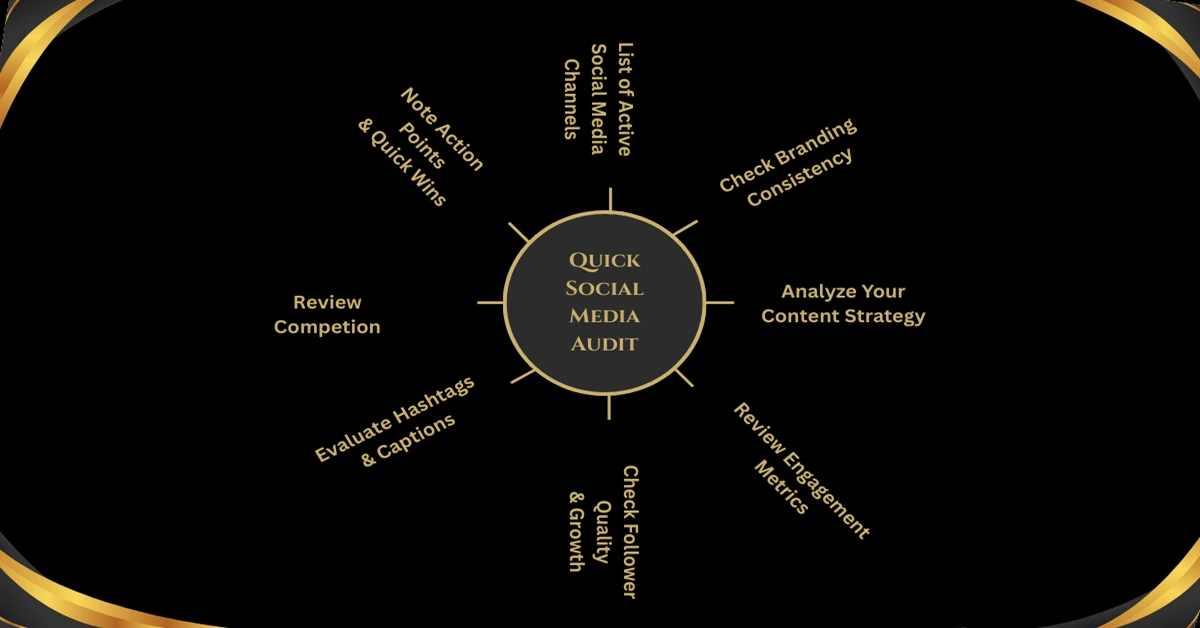
Step 1: List Your Active Social Media Channels
Write down every platform your brand is on—Facebook, Instagram, LinkedIn, Twitter/X, TikTok, Pinterest, YouTube, etc. You’ll be reviewing each one briefly.
Step 2: Check Branding Consistency
Look at your profile picture, bio, cover image, and handle. Are they consistent across platforms? Your brand should be easily recognizable—same logo, colors, tone, and website link.
Step 3: Analyze Your Content Strategy
Check your most recent 5–10 posts. Are they aligned with your business goals? Are you using a mix of content types—images, videos, reels, carousels, stories?
Quick Questions to Ask:
Are your posts visually on-brand?
Do they speak to your audience’s pain points or interests?
Are you posting consistently?
Step 4: Review Engagement Metrics
Pick your top 2–3 platforms. Check likes, comments, shares, saves, and reach. Which posts performed best? Why? Look for patterns in format, topic, or timing.
Step 5: Check Follower Quality and Growth
More followers don’t always mean better engagement. Review your follower growth trend. Are they real people or bots? Are they your target audience?
Step 6: Evaluate Hashtags and Captions
Are your hashtags relevant and optimized? Are captions engaging and call-to-action driven? Poor hashtags = poor discoverability. Boring captions = missed engagement.
Step 7: Review Competitors (Optional if You Have Time)
Take 5 minutes to glance at 1–2 competitors. What are they doing differently? What posts are getting attention? You might find ideas worth testing.
Step 8: Note Action Points and Quick Wins
Make a fast list of:
What’s working (keep doing it)
What’s not (fix or stop)
Easy wins (update bios, reuse high-performing content, remove old links)
Tools That Can Help Speed Things Up
Meta Business Suite – Great for Facebook/Instagram metrics
LinkedIn Analytics – For post engagement and audience breakdown
Hootsuite or Buffer – To monitor all platforms in one place
SocialBlade – For growth tracking
Canva or Adobe Express – To check visual consistency
Conclusion
You don’t need to spend hours crunching numbers to understand your social media performance. This 30-minute audit helps you take back control, focus on what matters, and stop wasting time on content that doesn’t move the needle. Want even better results? Make this a monthly habit—and watch your growth compound over time.
FAQs:



 in India

Pingback: Do Your Own SEO - 10 Quick Hacks To Grow Your Business
Pingback: 7 Amazing Web Design Ideas Using No-Code Builders